

The problem of hard waits and tools without auto-waiting
Hard waits and timeouts only do one thing: they instruct Playwright to wait for the specified time. This makes them dangerous: they are intuitive enough to be favored by beginners and inflexible enough to create serious issues. Let’s explore some issues in practical terms. Imagine a situation in which your script uses a tool without smart automatic waiting: then you need to wait until an element appears on a page to interact with it. To click a button you must ensure that this button is available in the current browser session. As a quick solution, you might consider adding a hard timeout. This could look something like the following:- You end up waiting a shorter time than the element takes to load!
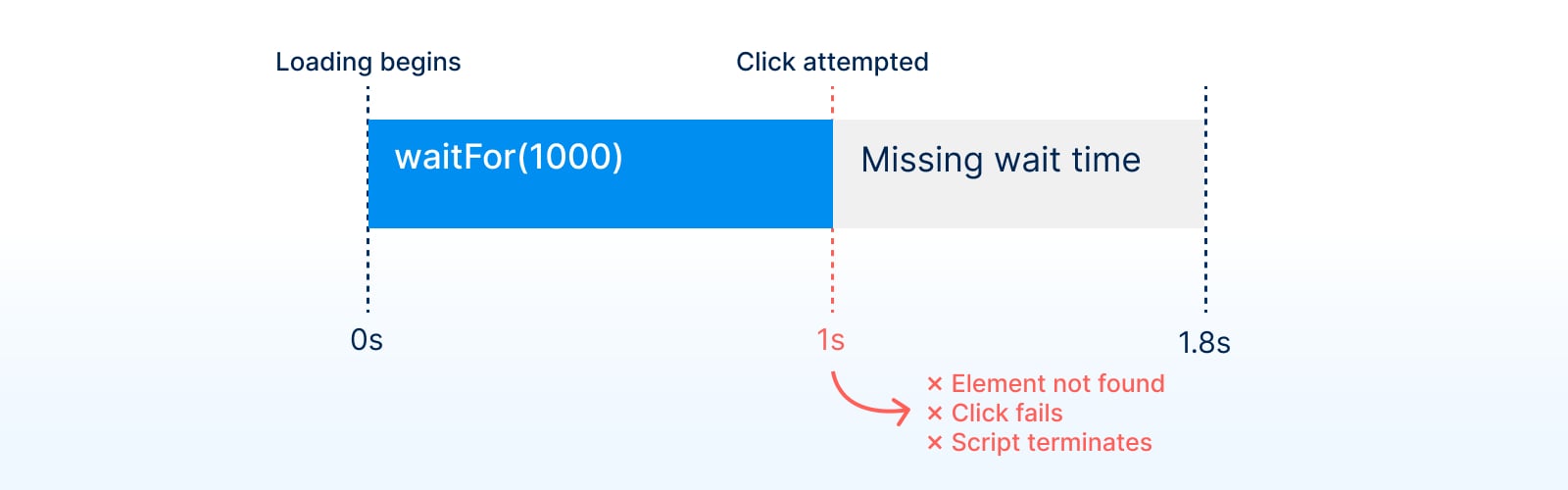
- The element loads before your hard wait has expired.
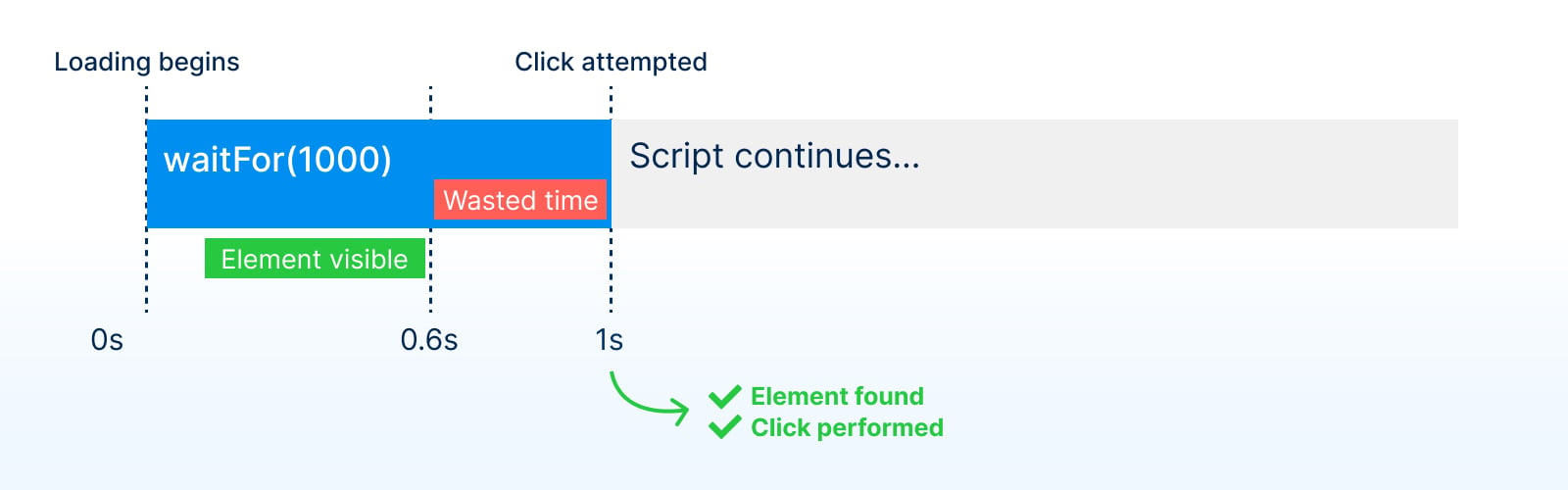
Avoiding hard waits by relying on Playwright’s auto-waiting actions and web-first assertions
To avoid these issues, you should forget that hard waits exist and adopt tools like Playwright, which provide auto-waiting mechanisms. Let’s revisit the previous example and use Playwright’s core functionality.wait statement. Hard waits are unnecessary in Playwright scripts because when you call a Playwright action such as click, fill or selectOption, Playwright automatically waits until a set of actionability checks pass.
Playwright’s actionability steps
To ensure your automation and testing actions behave correctly, Playwright enables you to forget about timings. Your job is to define browser actions and expected UI results; Playwright will figure out the rest. If you want to click an element, Playwright will only interact with it when the element is ready and actionable. The following checks evaluate actionability:- Does your defined locator resolve to exactly one element?
- Is the resulting element visible?
- Is the resulting element stable? (it’s not moving, animating or transitioning)
- Can the resulting element receive events? (it’s not covered or obscured by other elements)
- Is the resulting element enabled? (it doesn’t have a
disabledattribute)
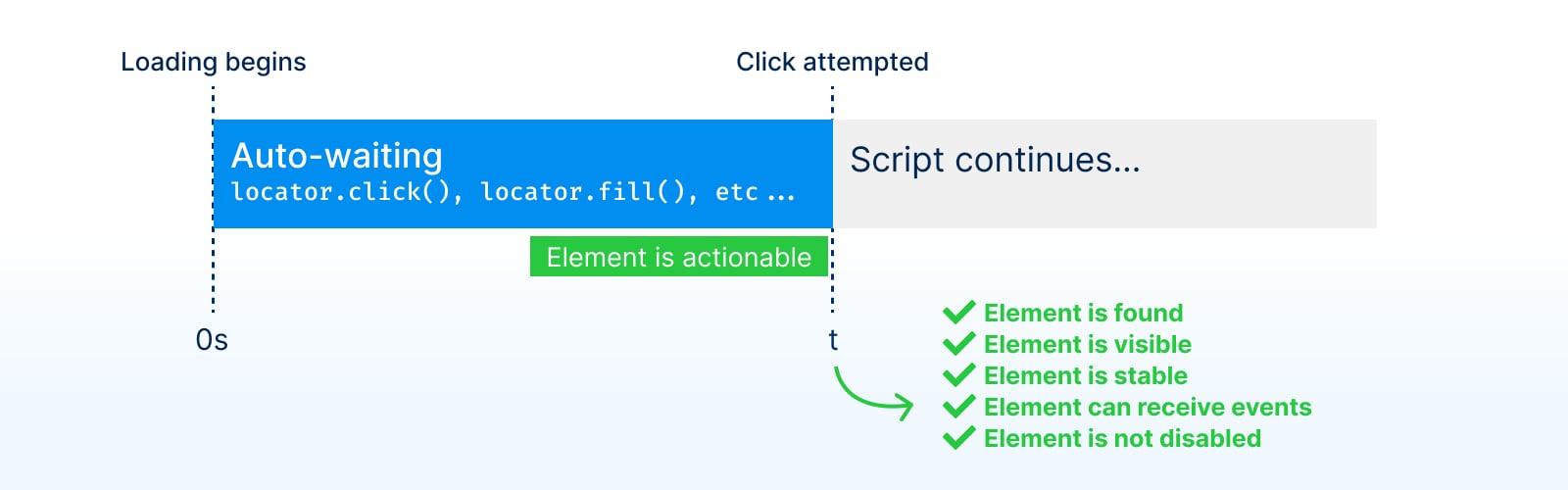
- Your Playwright scripts will be as quick as possible because Playwright will interact with elements whenever they’re ready.
- You can focus on defining UI actions and the expected results instead of worrying about network calls and timings.
Playwright’s web-first assertions
Auto-waiting Playwright actions help to avoid using hard waits when interacting with elements. But what if you want to wait for an element to appear on the page or reach a specific state before proceeding with your script? Playwright’s web-first assertions (toBe*) also provide auto-waiting capabilities. For example, to wait for an element to become visible, it’s recommended to use Playwright’s toBeVisible assertions. toBeVisible, toBeEnabled, toBeChecked and many more included assertions are asynchronous and wait for the elements to reach a certain state.
@playwright/test) and you want to wait for an element to be visible, use waitFor.
Other waiting mechanisms
Generally, it’s recommended to rely on Playwright’s auto-waiting and built-in web-first assertions, but if you must, here are some other waiting mechanisms.Waiting on navigations and network conditions in Playwright
When you can’t wait for an element to appear on a page and want to explicitly wait for the network, one of the otherwaitFor methods.
page.waitForLoadState
waitForLoadState waits until the required load state has been reached. It defaults to the page load event but can also be configured to wait for domcontentloaded or networkidle (discouraged).
page.waitForURL
waitForURL waits until a navigation to the target URL. It also defaults to the page load event but can be configured to wait for commit, domcontentloaded or networkidle (discouraged).
page.waitForRequest / page.waitForResponse
You can also wait until a request is sent or a response is received with waitForRequest and waitForResponse. These two methods are key for implementing request and response interception.
Waiting for page events
With Playwright, you can also directly wait forwaitForEvent.
Waiting for page functions
And for more advanced cases, you can pass a function to be evaluated within the browser context viawaitForFunction.
When auto-waiting isn’t enough
Sometimes a page looks ready, but it isn’t. Modern frontend frameworks often render static HTML first and attach JavaScript event handlers later, a step called hydration. A button can be visible, stable, and enabled while clicking it still does nothing. Playwright’s actionability checks pass, the click happens too early, and the next step fails.failing-test.spec.ts
page.waitForTimeout() makes this pass until the page gets slower. Use one of these alternatives instead.
Fix the page: disable controls until they work
If you can change the application, render the button with thedisabled attribute and enable it once its handler is attached. Playwright doesn’t click disabled elements, so auto-waiting works again. Users benefit too, because the button no longer invites clicks that do nothing.
Wait for the network response that makes the page ready
If readiness depends on a backend call, wait for that response.waitForResponse also accepts a predicate, which is useful when the same URL is polled several times:
Don’t
await the waitForResponse call itself. Create the promise first, trigger the request, then await the promise.Retry the interaction with toPass
If you can’t change the page and there’s no request to wait for, retry the whole interaction until it succeeds or the assertion times out:
retry-with-topass.spec.ts
Report slowness as degraded instead of failed
If the delay is a performance problem rather than a broken feature, use soft assertions to mark a Checkly check as degraded instead of failing it. Degraded checks show up in the dashboard without triggering the same alerts as a failure.Takeaways
- Never use hard waits or timeouts.
- Use auto-waiting instead.
- Combine auto-waiting actions with web-first assertions to test UI state instead of implementation details.
- When a page looks ready before it is, fix the page, wait for the right response, or retry the interaction with
toPass.
Bugs don’t stop at CI/CD. Why would Playwright? 
Sign up and start using Playwright for end-to-end monitoring with Checkly.