To run this guide from your terminal or your coding agent, run `npx checkly init` in your project first. It installs the Checkly CLI and [Checkly Skills](/ai/skills) for your agent. Then paste the prompt below into Claude Code, Cursor, Codex, or any agent that supports skills. It builds the same setup as this guide, proves it with `npx checkly test --record`, and stops for your confirmation before `npx checkly deploy`.
```txt Prompt theme={null}
The Checkly check "Shop checkout" in this project is failing. Find the root cause and prove it.
Success criteria:
1. Run `npx checkly checks list --status=failing` and `npx checkly checks get ` to find the failing result and its error group.
2. Read the root cause analysis with `npx checkly checks get --error-group `. Treat it as a hypothesis, not a verdict.
3. Download the Playwright trace with `npx checkly assets download` and read it with `npx playwright trace`: list the actions, show the failing action, list the requests, and extract the error-context attachment.
4. Tell me the root cause in two sentences, with the evidence from the trace that supports it.
5. Propose the smallest change to `tests/checkout.spec.ts` that confirms the diagnosis, apply it, and run `npx checkly test --record`. Show me the session link.
6. Wait for my confirmation before `npx checkly deploy`.
```
The steps below are what the agent does, in the open.
## Step 1: Find what failed
An alert tells you a check failed. Start from the terminal, not the dashboard. List the failing checks and open the one from the alert.
```bash Terminal theme={null}
npx checkly checks list --status=failing
```
```text Terminal theme={null}
✔ 80 passing ⚠ 1 degraded ✖ 2 failing (2 total checks)
NAME TYPE STATUS FREQ TAGS ID
Shop checkout PLAYWRIGHT failing 10m shop, checkout 8c688bf9-2c0a-4614-be7b-e66008b1093a
```
```bash Terminal theme={null}
npx checkly checks get 8c688bf9-2c0a-4614-be7b-e66008b1093a
```
```text Terminal theme={null}
Shop checkout
Type: PLAYWRIGHT
Status: failing
Frequency: Every 10m
Locations: us-east-1, eu-west-1
ERROR GROUPS
ERROR FIRST SEEN LAST SEEN RCA ERROR GROUP ID
Error: expect(locator).toBeVisible() failed Locator: getB… 2m ago 4s ago Yes 0653dbc0-9c7c-4eae-9417-deed85074a2e
RECENT RESULTS
TIME LOCATION STATUS RESPONSE TIME RESULT ID
41s ago eu-west-1 failing 35.74s 01a0df0e-99a6-7379-aab4-9e3f0bfcf420
43s ago us-east-1 failing 29.00s 01a0df0e-8e55-725d-978d-5b4b89c5a664
```
Two things matter here. Every result fails with the same error, so Checkly has folded them into one error group. And it fails from both locations, so this is not a regional blip. The `RCA` column says Rocky AI has already analyzed the group.
## Step 2: Read the error and the analysis
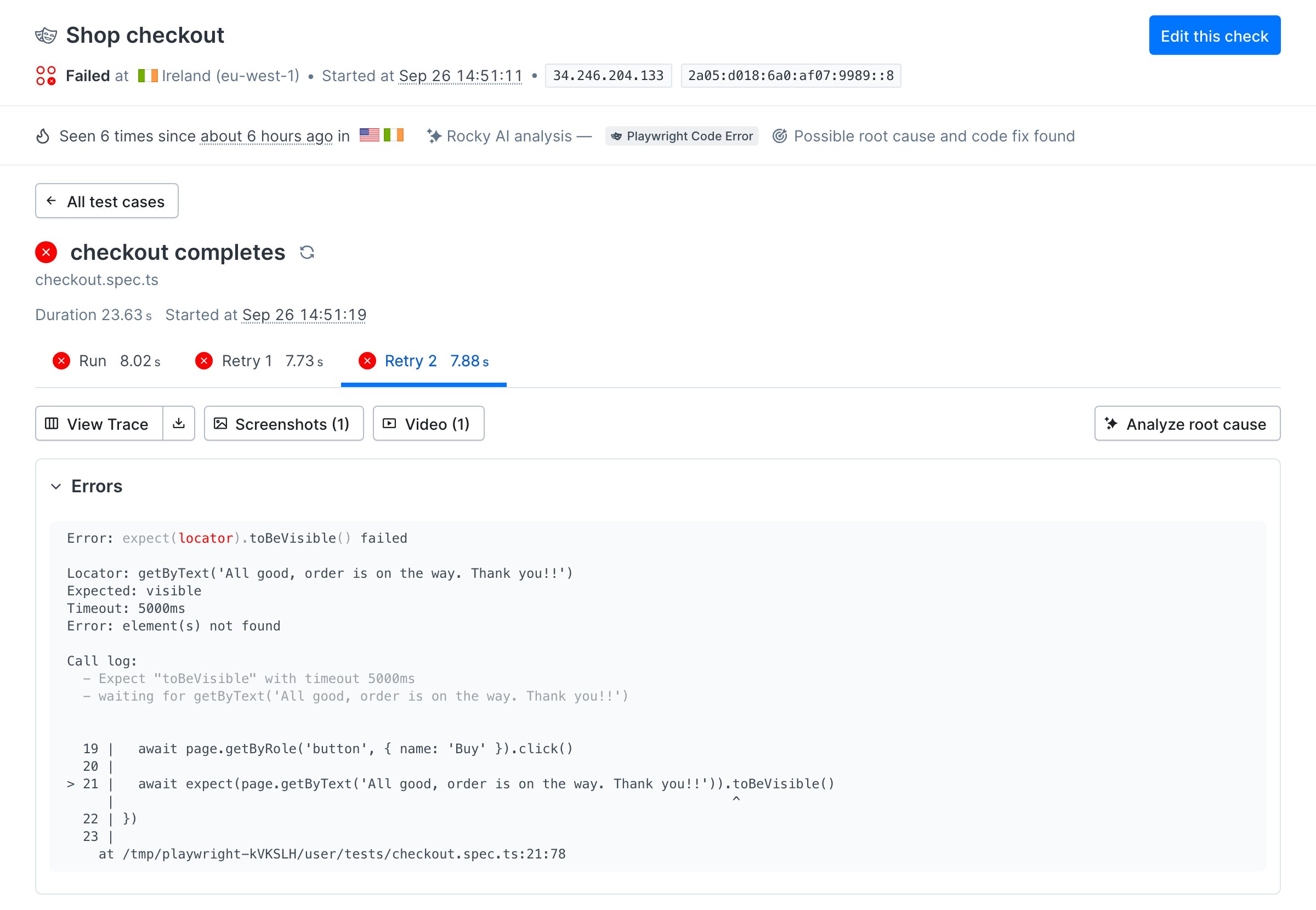
Open the error group. It prints the full Playwright error with the failing line, and below it the root cause analysis.
```bash Terminal theme={null}
npx checkly checks get 8c688bf9-2c0a-4614-be7b-e66008b1093a --error-group 0653dbc0-9c7c-4eae-9417-deed85074a2e
```
```text Terminal theme={null}
FULL ERROR
Error: expect(locator).toBeVisible() failed
Locator: getByText('All good, order is on the way. Thank you!!')
Expected: visible
Timeout: 5000ms
Error: element(s) not found
19 | await page.getByRole('button', { name: 'Buy' }).click()
20 |
> 21 | await expect(page.getByText('All good, order is on the way. Thank you!!')).toBeVisible()
| ^
ROOT CAUSE ANALYSIS
Classification: PLAYWRIGHT_CODE_ERROR
Root cause: The test immediately asserts that the success message "All good, order is on the way. Thank you!!" is visible without filling any checkout fields, so the page correctly shows a validation error instead of the success state. ...
EVIDENCE
· PLAYWRIGHT_TRACE — All three traces show the DOM snapshot at failure with the checkout form still present, validation message `Please fill in all fields.` and the `Buy` button, but no element containing the expected success text, ...
```
The error says what did not happen: the order confirmation never appeared after **Buy**. Rocky read the trace and found what happened instead: the form showed `Please fill in all fields.`. That is the lead.
Rocky's conclusion is a hypothesis, and this one is wrong in a detail that matters. Open the spec: it fills name, surname, address, zipcode, and city. Checkly scrubs form input values from stored traces, so the analysis could not see them. Whenever the analysis and your code disagree, the trace decides.
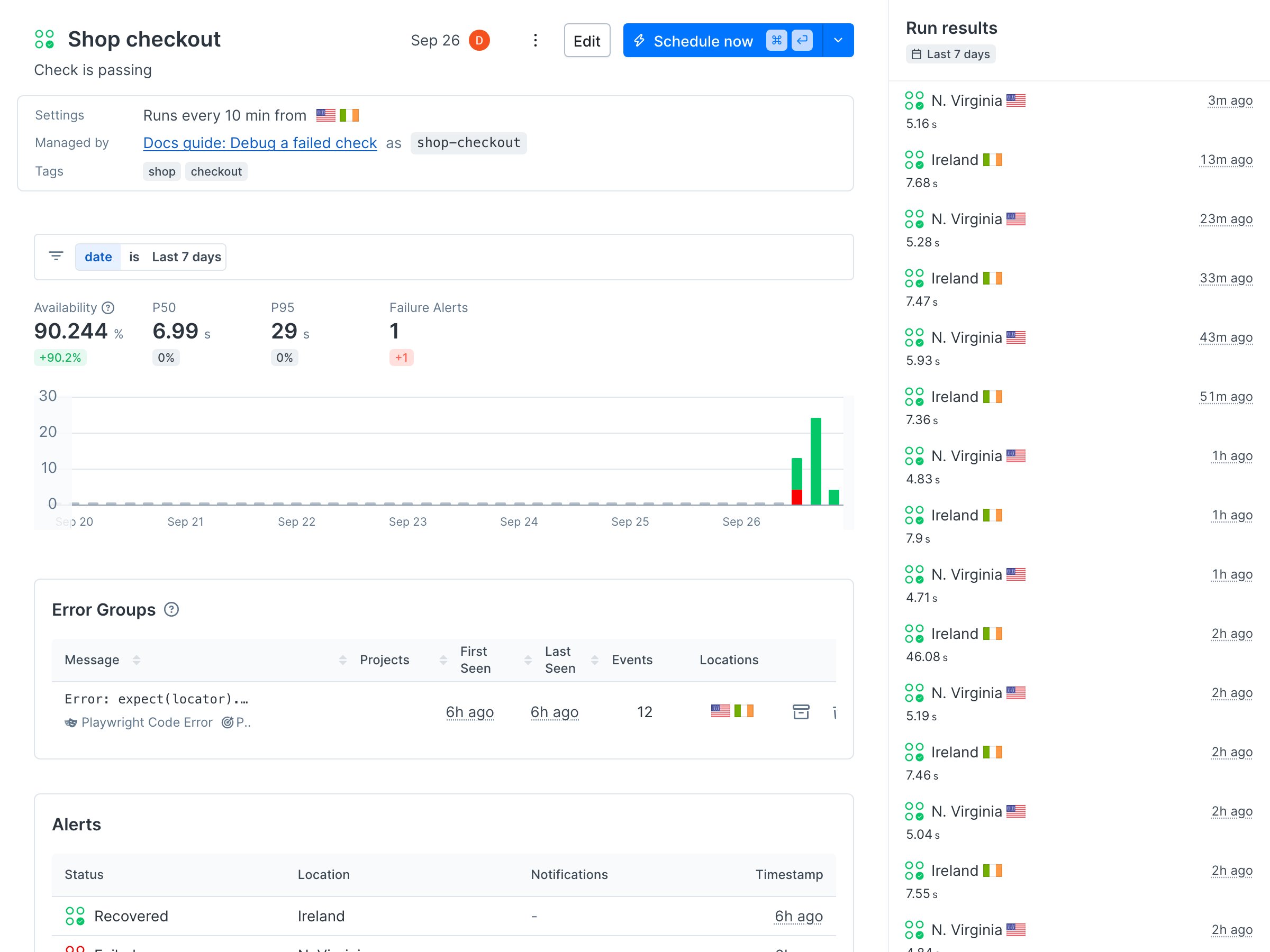 To follow along, clone the [sample project](https://github.com/checkly/docs/tree/main/samples/guides/debug-failed-check). It monitors the checkout of the [Danube demo shop](https://danube-web.shop), and it fails on purpose.
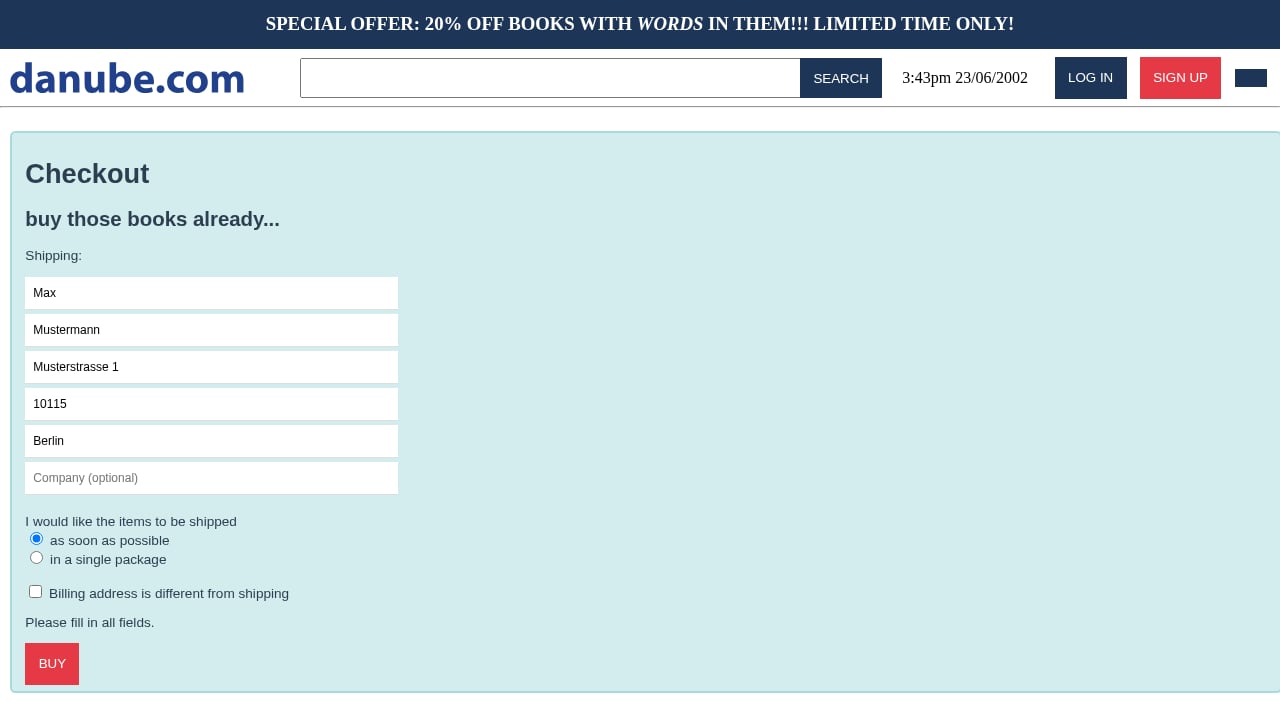
 Open the screenshot. The checkout form is still on screen, five fields are filled, the company field is empty, and the form says `Please fill in all fields.`.
 That is a strong lead, and a screenshot is one frame. The trace tells you what the click did and what the page looked like as text you can search.
## Step 4: Read the trace in the terminal
Download the trace for the failed result. Every asset belongs to one result, so pass the result ID and the check ID from step 1.
```bash Terminal theme={null}
npx checkly assets download --check-id=8c688bf9-2c0a-4614-be7b-e66008b1093a --result-id=01a0df0e-99a6-7379-aab4-9e3f0bfcf420 --type=trace
```
```text Terminal theme={null}
Downloaded archive asset
Path: ./checkly-assets/check-result-01a0df0e-99a6-7379-aab4-9e3f0bfcf420/assets.zip
```
Unzip it and open the first attempt's trace with Playwright's terminal trace viewer. It needs Playwright 1.59 or later.
```bash Terminal theme={null}
unzip -q checkly-assets/check-result-01a0df0e-99a6-7379-aab4-9e3f0bfcf420/assets.zip -d checkly-assets/result
npx playwright trace open checkly-assets/result/test-results/checkout-checkout-completes/trace.zip
npx playwright trace actions
```
```text Terminal theme={null}
19. 0:02.353 Fill "Berlin" 37ms
getByPlaceholder('City')
20. 0:02.392 Check 83ms
getByLabel('as soon as possible')
21. 0:02.476 Click 82ms
getByRole('button', { name: 'Buy' })
22. 0:02.561 Expect "toBeVisible" 5.0s ✗
getByText('All good, order is on the way. Thank you!!')
```
Every field was filled and **Buy** was clicked. Then the expectation waited five seconds for a confirmation that never came. Check what the click did on the network.
```bash Terminal theme={null}
npx playwright trace requests
```
```text Terminal theme={null}
18. GET 304 logo-horizontal.svg 73ms -
19. GET 200 books 72ms 19
20. POST 200 logs 176ms 88
```
No order was sent. The last request to the shop is the cart's `books` lookup, before the click. Whatever stopped the order happened in the browser, so look at the page as it was when the test failed. Playwright attaches it as `error-context`.
```bash Terminal theme={null}
npx playwright trace attachments
npx playwright trace attachment 4
```
```text Terminal theme={null}
- textbox "Name" [ref=e21]: Max
- textbox "Surname" [ref=e22]: Mustermann
- textbox "Address" [ref=e23]: Musterstrasse 1
- textbox "Zipcode" [ref=e24]: "10115"
- textbox "City" [ref=e25]: Berlin
- textbox "Company (optional)" [ref=e26]
- text: I would like the items to be shipped
- radio "as soon as possible" [checked] [ref=e27]
...
- paragraph: Please fill in all fields.
- button "Buy"
```
There is the root cause. Five fields are filled, the sixth is labelled optional and empty, and the form refuses to submit with `Please fill in all fields.`. The check is doing exactly what a customer without a company would do, and that customer cannot buy. This is an application bug, not a monitoring bug.
That is a strong lead, and a screenshot is one frame. The trace tells you what the click did and what the page looked like as text you can search.
## Step 4: Read the trace in the terminal
Download the trace for the failed result. Every asset belongs to one result, so pass the result ID and the check ID from step 1.
```bash Terminal theme={null}
npx checkly assets download --check-id=8c688bf9-2c0a-4614-be7b-e66008b1093a --result-id=01a0df0e-99a6-7379-aab4-9e3f0bfcf420 --type=trace
```
```text Terminal theme={null}
Downloaded archive asset
Path: ./checkly-assets/check-result-01a0df0e-99a6-7379-aab4-9e3f0bfcf420/assets.zip
```
Unzip it and open the first attempt's trace with Playwright's terminal trace viewer. It needs Playwright 1.59 or later.
```bash Terminal theme={null}
unzip -q checkly-assets/check-result-01a0df0e-99a6-7379-aab4-9e3f0bfcf420/assets.zip -d checkly-assets/result
npx playwright trace open checkly-assets/result/test-results/checkout-checkout-completes/trace.zip
npx playwright trace actions
```
```text Terminal theme={null}
19. 0:02.353 Fill "Berlin" 37ms
getByPlaceholder('City')
20. 0:02.392 Check 83ms
getByLabel('as soon as possible')
21. 0:02.476 Click 82ms
getByRole('button', { name: 'Buy' })
22. 0:02.561 Expect "toBeVisible" 5.0s ✗
getByText('All good, order is on the way. Thank you!!')
```
Every field was filled and **Buy** was clicked. Then the expectation waited five seconds for a confirmation that never came. Check what the click did on the network.
```bash Terminal theme={null}
npx playwright trace requests
```
```text Terminal theme={null}
18. GET 304 logo-horizontal.svg 73ms -
19. GET 200 books 72ms 19
20. POST 200 logs 176ms 88
```
No order was sent. The last request to the shop is the cart's `books` lookup, before the click. Whatever stopped the order happened in the browser, so look at the page as it was when the test failed. Playwright attaches it as `error-context`.
```bash Terminal theme={null}
npx playwright trace attachments
npx playwright trace attachment 4
```
```text Terminal theme={null}
- textbox "Name" [ref=e21]: Max
- textbox "Surname" [ref=e22]: Mustermann
- textbox "Address" [ref=e23]: Musterstrasse 1
- textbox "Zipcode" [ref=e24]: "10115"
- textbox "City" [ref=e25]: Berlin
- textbox "Company (optional)" [ref=e26]
- text: I would like the items to be shipped
- radio "as soon as possible" [checked] [ref=e27]
...
- paragraph: Please fill in all fields.
- button "Buy"
```
There is the root cause. Five fields are filled, the sixth is labelled optional and empty, and the form refuses to submit with `Please fill in all fields.`. The check is doing exactly what a customer without a company would do, and that customer cannot buy. This is an application bug, not a monitoring bug.