> ## Documentation Index
> Fetch the complete documentation index at: https://checkly-422f444a-simo-red-1015-maintenance-window-timezone.mintlify.site/llms.txt
> Use this file to discover all available pages before exploring further.

# Monitor the content your customers need to see

> Assert that your best seller, offer banner, and call to action are on the page, in the right place, exactly once, and that error copy never is, with one Playwright test that runs every five minutes.

export const CopyPromptButton = ({label = "Copy setup prompt", targetId = "ai-setup-prompt"}) => {
  const [copied, setCopied] = useState(false);
  const handleCopy = async () => {
    try {
      const el = document.getElementById(targetId);
      const code = el?.querySelector("code");
      const text = code?.textContent || el?.textContent || "";
      await navigator.clipboard.writeText(text);
      setCopied(true);
      setTimeout(() => setCopied(false), 2000);
    } catch (err) {
      console.error("Failed to copy prompt:", err);
    }
  };
  return <button onClick={handleCopy} className="inline-flex items-center gap-2 px-5 py-3 rounded-lg font-semibold text-base
        border border-gray-200 dark:border-gray-700
        bg-white dark:bg-gray-800
        text-gray-800 dark:text-gray-200
        hover:bg-gray-50 dark:hover:bg-gray-700
        transition-colors cursor-pointer my-2">
      {copied ? <>
          <svg width="18" height="18" viewBox="0 0 16 16" fill="none">
            <path d="M13.3 4.3L6 11.6L2.7 8.3" stroke="currentColor" strokeWidth="2" strokeLinecap="round" strokeLinejoin="round" />
          </svg>
          Copied!
        </> : <>
          <svg width="18" height="18" viewBox="0 0 16 16" fill="none">
            <rect x="5" y="5" width="9" height="9" rx="1.5" stroke="currentColor" strokeWidth="1.5" />
            <path d="M11 5V3.5C11 2.67 10.33 2 9.5 2H3.5C2.67 2 2 2.67 2 3.5V9.5C2 10.33 2.67 11 3.5 11H5" stroke="currentColor" strokeWidth="1.5" />
          </svg>
          {label}
        </>}
    </button>;
};

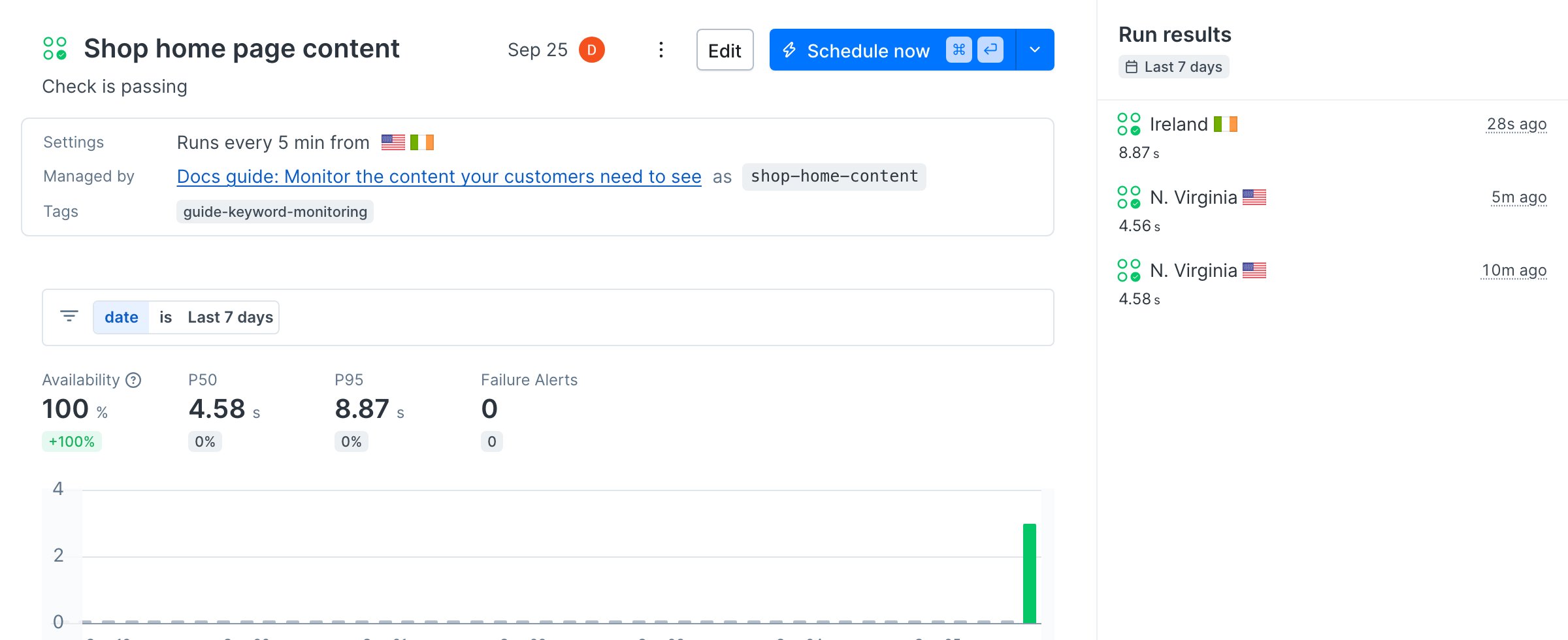
By the end of this guide, one Playwright test checks that your shop's home page shows the content that sells, runs every five minutes from two regions, and names the exact text that went missing when it fails.

<Frame>
  <img src="https://mintcdn.com/checkly-422f444a-simo-red-1015-maintenance-window-timezone/dttTjQ9emJL9jpwK/images/guides/keyword-monitoring/check-detail.png?fit=max&auto=format&n=dttTjQ9emJL9jpwK&q=85&s=b02ec13bd13611351c224cd95df61641" alt="The Shop home page content Playwright Check Suite in Checkly, passing, running every 5 minutes from N. Virginia and Ireland, managed by the Docs guide project" width="2400" height="980" data-path="images/guides/keyword-monitoring/check-detail.png" />
</Frame>

To follow along without your own app, clone the [sample project](https://github.com/checkly/docs/tree/main/samples/guides/keyword-monitoring). It monitors the home page of the [Danube demo shop](https://danube-web.shop).

<Accordion title="Let your agent do it" icon="sparkles">
  To run this guide from your terminal or your coding agent, run `npx checkly init` in your project first. It installs the Checkly CLI and [Checkly Skills](/ai/skills) for your agent. Then paste the prompt below into Claude Code, Cursor, Codex, or any agent that supports skills. It builds the same setup as this guide, proves it with `npx checkly test --record`, and stops for your confirmation before `npx checkly deploy`.

  <div id="ai-setup-prompt">
    ```txt Prompt theme={null}
    Monitor the content on my home page that customers need to see, with Checkly.

    Goal: one Playwright test that fails when key text is missing, misplaced, duplicated, or when error copy appears, running every 5 minutes from us-east-1 and eu-west-1.

    Success criteria:
    1. Ask me which content matters: the product or headline that must be first, any banner that must appear exactly once, the call to action and its approved wordings, and error messages that must never show.
    2. Write `tests/home-content.spec.ts`. Scope each assertion to the element it belongs to instead of matching text anywhere on the page. Use `toHaveText` for exact text, `toHaveCount(1)` for things that must appear once, a case-insensitive regular expression for approved variations, and `toHaveCount(0)` for error copy. Do not use `.first()` to silence strict mode violations.
    3. In `checkly.config.ts`, define one entry in `playwrightChecks` that runs every 5 minutes from us-east-1 and eu-west-1.
    4. Run `npx checkly test --record` and show me the session link.
    5. Stop. Show me `npx checkly deploy --preview` and wait for my confirmation before `npx checkly deploy`.

    Explain each file you changed and why.
    ```
  </div>

  <CopyPromptButton />

  The steps below are what the agent does, in the open.
</Accordion>

## Step 1: Write down what must be on the page

An uptime monitor tells you the home page answered. It can't tell you the page is selling. If a deploy drops your best seller from the top spot, duplicates the offer banner, or renders an error message inside a healthy 200 response, customers notice long before a status code does.

Write each of those expectations as an assertion:

```ts tests/home-content.spec.ts theme={null}
import { test, expect } from '@playwright/test'

test('home page shows the content that sells', async ({ page }) => {
  await page.goto('https://danube-web.shop/')

  // The best seller is the first book on the page, not just somewhere on it.
  const bestSeller = page.locator('.preview').first()
  await expect(bestSeller.locator('.preview-title')).toHaveText('Haben oder haben')

  // "$9.95" appears on every book. Scope the price to the best seller's card.
  await expect(bestSeller.locator('.preview-price')).toHaveText('$9.95')

  // The offer banner must be there exactly once.
  await expect(page.getByText(/special offer/i)).toHaveCount(1)

  // Marketing rewords the call to action. Accept any of the approved wordings.
  await expect(
    page.getByRole('button', { name: /sign up|register|create an account/i }),
  ).toBeVisible()

  // Error copy must never reach the storefront.
  await expect(page.getByText(/something went wrong|internal server error/i)).toHaveCount(0)
})
```

Every assertion is web-first, so Playwright retries it until it passes or times out. There is no wait to tune. See [waits and timeouts](/learn/playwright/waits-and-timeouts) for why that matters.

## Step 2: Match the keyword where it belongs

The simplest keyword check is `page.getByText('keyword')`. It works until the keyword appears more than once. On the Danube shop, every book costs \$9.95:

```ts theme={null}
await expect(page.getByText('$9.95')).toBeVisible()
```

```text Terminal theme={null}
Error: expect(locator).toBeVisible() failed

Locator: getByText('$9.95')
Expected: visible
Error: strict mode violation: getByText('$9.95') resolved to 30 elements:
    1) <p data-v-159be0e2="" class="preview-price">$9.95</p> aka getByText('$').first()
    2) <p data-v-159be0e2="" class="preview-price">$9.95</p> aka getByText('$').nth(1)
    ...
```

Adding `.first()` makes the error go away and the check useless: it passes as long as any book costs \$9.95. The test in Step 1 answers a sharper question instead. Each choice maps to a way content breaks:

* **Position matters:** the best seller is located as the first `.preview` card, and `toHaveText` requires its title to be exactly "Haben oder haben". A reorder fails the check, and so does a truncated or renamed title.
* **Context matters:** the price is looked up inside the best seller's card, so it checks that book's price, not any price.
* **Duplicates matter:** `toHaveCount(1)` fails if the offer banner disappears and also if a layout bug renders it twice.
* **Wording varies:** the call to action is matched by role and a case-insensitive regular expression, so marketing can rename "Sign up" to "Create an account" without breaking the monitor. Regular expressions in Playwright are case-sensitive unless you add the `i` flag.
* **Absence matters:** `toHaveCount(0)` turns error copy into a failure, even when the page itself loads fine.

## Step 3: Run it on a schedule

Run the test as a Playwright Check Suite, or as a Browser Check if you prefer one file per check. Both use the same spec file.
<CodeGroup>
  ```ts checkly.config.ts theme={null}
  import { defineConfig } from 'checkly'
  import { Frequency } from 'checkly/constructs'

  export default defineConfig({
    projectName: 'Docs guide: Monitor the content your customers need to see',
    logicalId: 'docs-guide-keyword-monitoring',
    repoUrl: 'https://github.com/checkly/docs',
    checks: {
      tags: ['guide-keyword-monitoring'],
      checkMatch: '**/checks/**/*.check.ts',
      playwrightConfigPath: './playwright.config.ts',
      playwrightChecks: [
        {
          name: 'Shop home page content',
          logicalId: 'shop-home-content',
          frequency: Frequency.EVERY_5M,
          locations: ['us-east-1', 'eu-west-1'],
        },
      ],
    },
    cli: { runLocation: 'us-east-1' },
  })
  ```

  ```ts checks/home-content.check.ts theme={null}
  import { BrowserCheck, Frequency } from 'checkly/constructs'
  import * as path from 'path'

  // The same spec file as a single Browser Check.
  new BrowserCheck('shop-home-content-browser-check', {
    name: 'Shop home page content (Browser Check)',
    frequency: Frequency.EVERY_5M,
    locations: ['us-east-1', 'eu-west-1'],
    code: {
      entrypoint: path.join(__dirname, '../tests/home-content.spec.ts'),
    },
    // Runs with `npx checkly test` but is skipped by `npx checkly deploy`,
    // so this sample deploys only the Check Suite.
    testOnly: true,
  })
  ```
</CodeGroup>

The Playwright Check Suite reads `playwright.config.ts`, which keeps a trace and a screenshot of every failure:

```ts playwright.config.ts theme={null}
import { defineConfig, devices } from '@playwright/test'

export default defineConfig({
  testDir: './tests',
  use: {
    trace: 'retain-on-failure',
    screenshot: 'only-on-failure',
    ...devices['Desktop Chrome'],
  },
})
```

Run both on Checkly before you deploy:

```bash Terminal theme={null}
npx checkly test --record
```

```text Terminal theme={null}
Running 2 checks in us-east-1.

checks/home-content.check.ts
  ✔ Shop home page content (Browser Check) (3s)
playwright.config.ts
  ✔ Shop home page content (7s)

2 passed, 2 total
```

```bash Terminal theme={null}
npx checkly deploy
```

## Verify it works

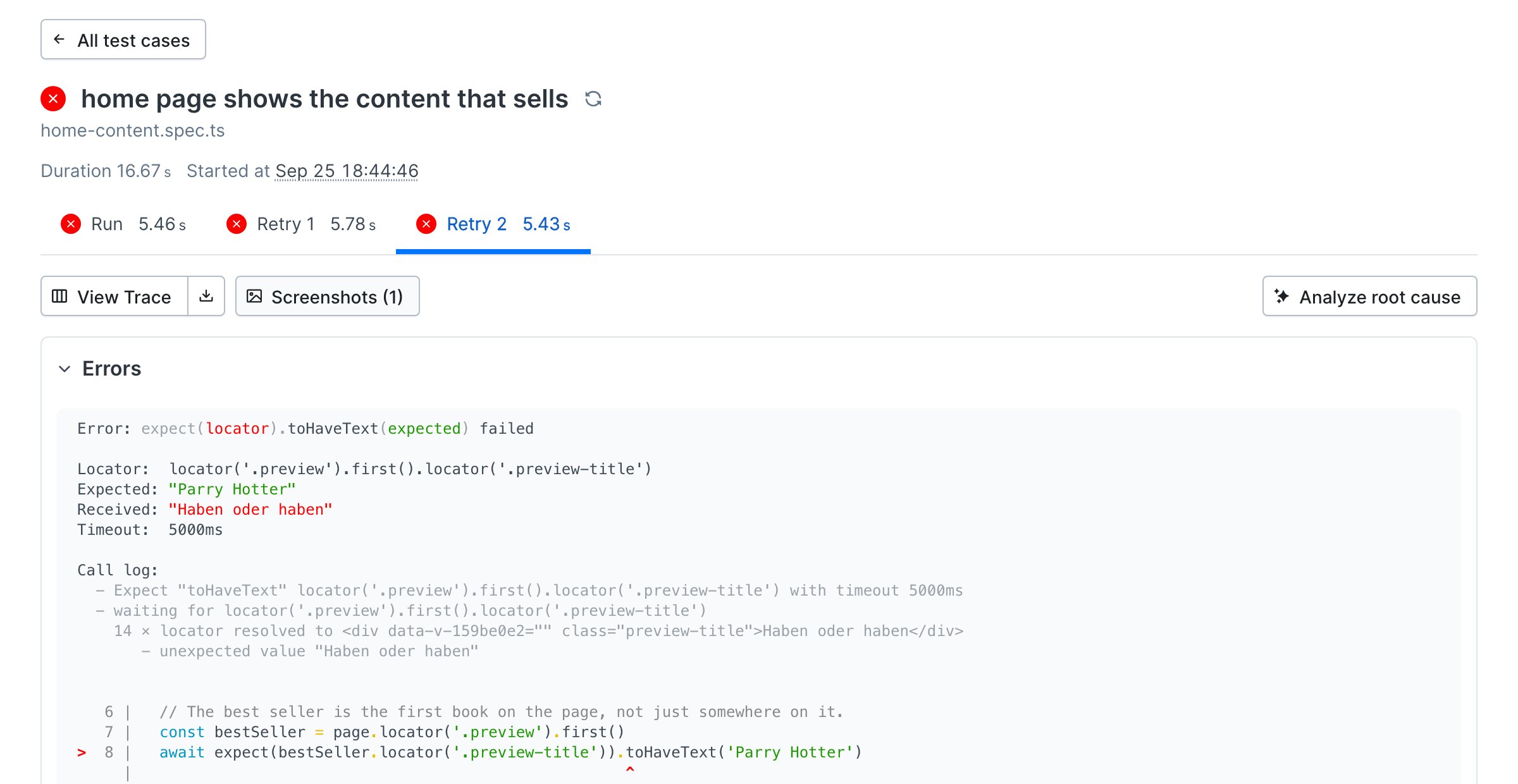
Simulate the shop reordering its best sellers. In `tests/home-content.spec.ts`, change the expected title from `'Haben oder haben'` to `'Parry Hotter'`, the second book on the page, and run `npx checkly test --record` again. Both checks fail. The result names the assertion, the text it expected, and the text it found:

<Frame>
  <img src="https://mintcdn.com/checkly-422f444a-simo-red-1015-maintenance-window-timezone/dttTjQ9emJL9jpwK/images/guides/keyword-monitoring/verify-failing.png?fit=max&auto=format&n=dttTjQ9emJL9jpwK&q=85&s=15aa295dd4b8840cdc08a43529d4ea34" alt="A failed Checkly test case named home page shows the content that sells, with the error expect locator toHaveText failed, expected Parry Hotter, received Haben oder haben, and the failing line of the spec highlighted" width="2400" height="1240" data-path="images/guides/keyword-monitoring/verify-failing.png" />
</Frame>

Change the title back before you deploy again.

## Next

[Monitor from around the globe](/guides/global-monitoring): content can differ by region when a CDN serves a stale page or a locale redirect goes wrong. Choose the locations that match where your customers are.

## Reference

* [Playwright Check Suites](/detect/synthetic-monitoring/playwright-checks/overview) and [Browser Checks](/detect/synthetic-monitoring/browser-checks/overview)
* [Assertions in Playwright](/learn/playwright/assertions) and [locators](/learn/playwright/selectors)
* [`BrowserCheck`](/constructs/browser-check) and [project configuration](/constructs/project)
* [Checkly Skills](/ai/skills)


This documentation is built and hosted on [Mintlify](https://mintlify.com), a developer documentation platform.