> ## Documentation Index
> Fetch the complete documentation index at: https://checkly-422f444a-simo-red-1015-maintenance-window-timezone.mintlify.site/llms.txt
> Use this file to discover all available pages before exploring further.

# A status page backed by real monitors

> Build a public status page in code whose components go red when the checks that test them fail, and read and update its incidents from your coding agent with the Checkly MCP server.

export const CopyPromptButton = ({label = "Copy setup prompt", targetId = "ai-setup-prompt"}) => {
  const [copied, setCopied] = useState(false);
  const handleCopy = async () => {
    try {
      const el = document.getElementById(targetId);
      const code = el?.querySelector("code");
      const text = code?.textContent || el?.textContent || "";
      await navigator.clipboard.writeText(text);
      setCopied(true);
      setTimeout(() => setCopied(false), 2000);
    } catch (err) {
      console.error("Failed to copy prompt:", err);
    }
  };
  return <button onClick={handleCopy} className="inline-flex items-center gap-2 px-5 py-3 rounded-lg font-semibold text-base
        border border-gray-200 dark:border-gray-700
        bg-white dark:bg-gray-800
        text-gray-800 dark:text-gray-200
        hover:bg-gray-50 dark:hover:bg-gray-700
        transition-colors cursor-pointer my-2">
      {copied ? <>
          <svg width="18" height="18" viewBox="0 0 16 16" fill="none">
            <path d="M13.3 4.3L6 11.6L2.7 8.3" stroke="currentColor" strokeWidth="2" strokeLinecap="round" strokeLinejoin="round" />
          </svg>
          Copied!
        </> : <>
          <svg width="18" height="18" viewBox="0 0 16 16" fill="none">
            <rect x="5" y="5" width="9" height="9" rx="1.5" stroke="currentColor" strokeWidth="1.5" />
            <path d="M11 5V3.5C11 2.67 10.33 2 9.5 2H3.5C2.67 2 2 2.67 2 3.5V9.5C2 10.33 2.67 11 3.5 11H5" stroke="currentColor" strokeWidth="1.5" />
          </svg>
          {label}
        </>}
    </button>;
};

By the end of this guide, you have a public status page defined in code, with components named the way your users talk about your product, and automation rules that open and resolve incidents from the checks that test each component.

<Frame>
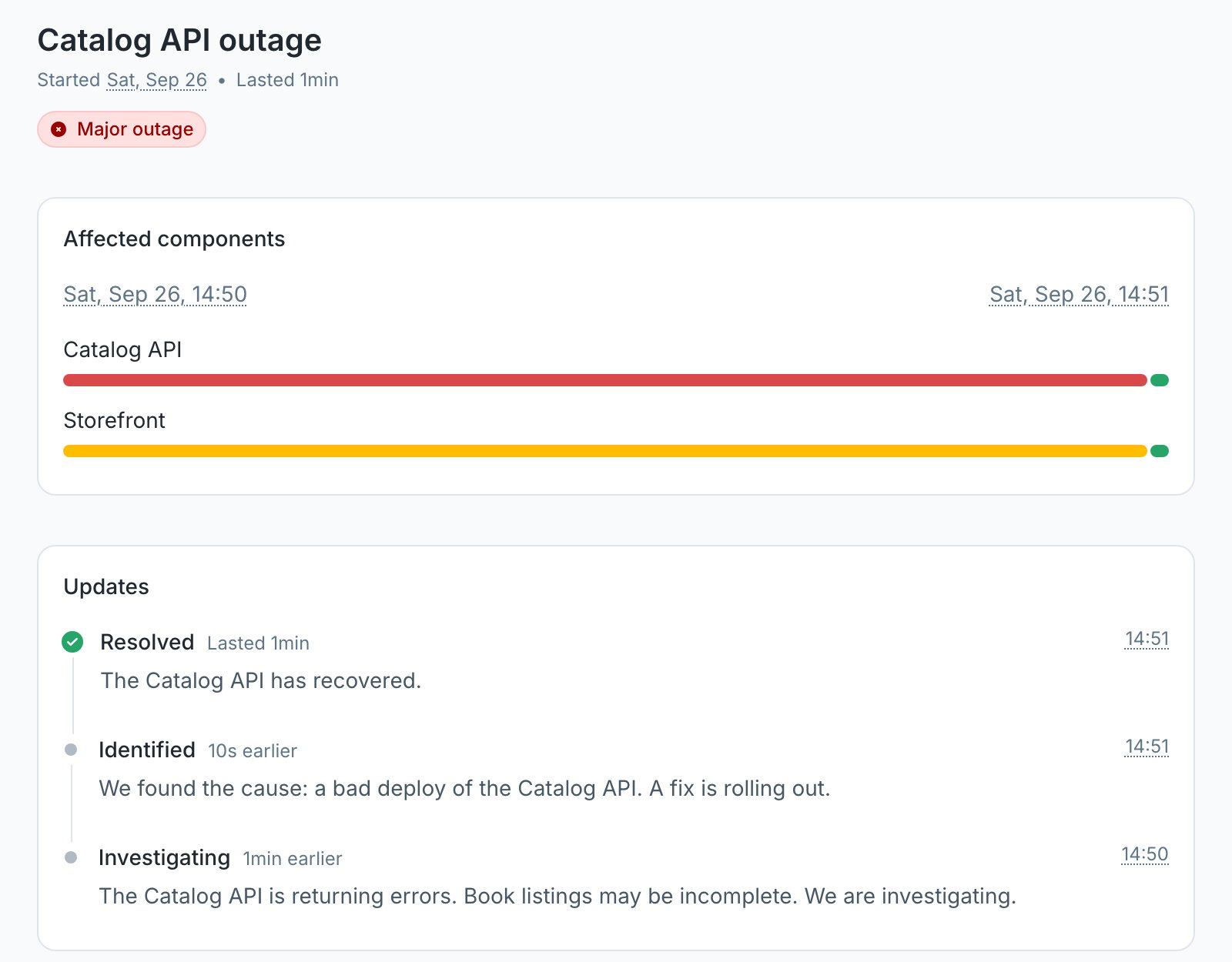
  <img src="https://mintcdn.com/checkly-422f444a-simo-red-1015-maintenance-window-timezone/VdlVih9ongP3hoLV/images/guides/communicate-availability/incident-open.png?fit=max&auto=format&n=VdlVih9ongP3hoLV&q=85&s=f6ac8150a31e80130b49f1105530c84c" alt="Public Checkly status page Danube Shop Status reporting 2 services experiencing issues, with an open Catalog API outage incident in Investigating state, the Catalog API component in major outage, and the Storefront component in degraded performance" width="1600" height="1480" data-path="images/guides/communicate-availability/incident-open.png" />
</Frame>

To follow along without your own app, clone the [sample project](https://github.com/checkly/docs/tree/main/samples/guides/communicate-availability). It monitors the search flow and the books API of the [Danube demo shop](https://danube-web.shop).

<Accordion title="Let your agent do it" icon="sparkles">
  To run this guide from your terminal or your coding agent, run `npx checkly init` in your project first. It installs the Checkly CLI and [Checkly Skills](/ai/skills) for your agent. Then paste the prompt below into Claude Code, Cursor, Codex, or any agent that supports skills. It builds the same setup as this guide, proves it with `npx checkly test --record`, and stops for your confirmation before `npx checkly deploy`.

  <div id="ai-setup-prompt">
    ```txt Prompt theme={null}
    Set up a public Checkly status page for this project, driven by the checks that test each user-facing feature.

    Success criteria:
    1. Ask me which features my users depend on. Model each as a `StatusPageV3Component` on one `StatusPageV3`, grouped under a `GROUP` component, named the way users talk about them.
    2. Make sure each component has a check that proves it works: a Playwright Check Suite or Browser Check for browser flows, an API check for public APIs. Give each check a tag only its component uses, such as `status-storefront`.
    3. Add a `StatusPageV3AutomationRule` per tag that sets the component to `MAJOR_OUTAGE`, with a first and last update written for customers. When one feature depends on another, list the dependent component too with a lower impact.
    4. Set a project-wide retry strategy, so a single failed request never opens a public incident.
    5. Run `npx checkly test --record` and show me the session link.
    6. Show me `npx checkly deploy --preview` and wait for my confirmation before deploying. Then give me the public status page URL.

    Explain each file you changed and why.
    ```
  </div>

  <CopyPromptButton />

  The steps below are what the agent does, in the open.
</Accordion>

## Step 1: Tag the checks that prove each feature works

A status page is only as honest as what drives it. Drive each component with a check that does what a user does: search for a book, call the API, and assert on the answer.

The tag on each check is the contract between the check and the status page. Use one tag per component, and do not reuse it for anything else.

The storefront component is backed by a search flow. Run it as a Playwright Check Suite or a Browser Check. Both use the same test file:
<CodeGroup>
  ```ts checkly.config.ts highlight={11-16,25-26} theme={null}
  import { defineConfig } from 'checkly'
  import { Frequency, RetryStrategyBuilder } from 'checkly/constructs'

  export default defineConfig({
    projectName: 'Docs guide: A status page backed by real monitors',
    logicalId: 'docs-guide-communicate-availability',
    repoUrl: 'https://github.com/checkly/docs',
    checks: {
      frequency: Frequency.EVERY_5M,
      locations: ['us-east-1', 'eu-west-1'],
      // A public incident needs a confirmed failure, not a blip.
      retryStrategy: RetryStrategyBuilder.fixedStrategy({
        baseBackoffSeconds: 30,
        maxRetries: 2,
        sameRegion: true,
      }),
      checkMatch: '**/checks/**/*.check.ts',
      playwrightConfigPath: './playwright.config.ts',
      playwrightChecks: [
        {
          name: 'Storefront search',
          logicalId: 'storefront-search',
          frequency: Frequency.EVERY_10M,
          locations: ['us-east-1', 'eu-west-1'],
          // The tag is what connects this check to the Storefront component.
          tags: ['status-storefront'],
        },
      ],
    },
    cli: {
      runLocation: 'us-east-1',
    },
  })
  ```

  ```ts checks/search.check.ts theme={null}
  import { BrowserCheck, Frequency } from 'checkly/constructs'
  import * as path from 'path'

  new BrowserCheck('storefront-search-browser', {
    name: 'Storefront search (Browser Check)',
    frequency: Frequency.EVERY_10M,
    // The tag is what connects this check to the Storefront component.
    tags: ['status-storefront'],
    code: {
      entrypoint: path.join(__dirname, '../tests/search.spec.ts'),
    },
  })
  ```
</CodeGroup>

```ts tests/search.spec.ts theme={null}
import { test, expect } from '@playwright/test'

test('a shopper can search for a book', async ({ page }) => {
  await page.goto('https://danube-web.shop/')

  await page.locator('input[name="searchbar"]').fill('haben')
  await page.getByRole('button', { name: 'Search' }).click()

  await expect(page.locator('.preview').first()).toContainText('Haben oder haben')
})
```

The retry strategy in the config matters more here than anywhere else. An alert that fires on a blip wakes one person. An incident that opens on a blip tells every customer your shop is down. Each failed run is retried twice in the same region before it counts.

The Catalog API component is backed by an API check on the endpoint the storefront reads from:

```ts checks/books-api.check.ts highlight={5-6} theme={null}
import { ApiCheck, AssertionBuilder } from 'checkly/constructs'

new ApiCheck('catalog-api-books', {
  name: 'Catalog API: list books',
  // The tag is what connects this check to the Catalog API component.
  tags: ['status-catalog-api'],
  degradedResponseTime: 1000,
  maxResponseTime: 5000,
  request: {
    method: 'GET',
    url: 'https://danube-web.shop/api/books',
    assertions: [
      AssertionBuilder.statusCode().equals(200),
      AssertionBuilder.jsonBody('$.length').greaterThan(0),
    ],
  },
})
```

## Step 2: Describe the page in code

A status page is built from components. A component is either a service with its own status and 90-day uptime, or a group that nests services under one heading and shows their average uptime.

Name components after what users do, not after your architecture. Your users search for books. They do not care which pod serves the search.

```ts checks/status-page.check.ts theme={null}
import {
  StatusPageV3,
  StatusPageV3AutomationRule,
  StatusPageV3Component,
} from 'checkly/constructs'

export const statusPage = new StatusPageV3('danube-status', {
  name: 'Danube Shop Status',
  url: 'danube-shop-status',
  description: 'Live status of the Danube web shop, measured by synthetic monitors.',
  defaultTheme: 'AUTO',
})

// Components are named the way your users talk about the product.
const shop = new StatusPageV3Component('shop-group', {
  statusPage,
  type: 'GROUP',
  name: 'Danube shop',
  displayOrder: 0,
})

const storefront = new StatusPageV3Component('storefront', {
  statusPage,
  name: 'Storefront',
  description: 'Browsing and searching for books',
  parent: shop,
  displayOrder: 1,
})

const catalogApi = new StatusPageV3Component('catalog-api', {
  statusPage,
  name: 'Catalog API',
  description: 'The public books API',
  parent: shop,
  displayOrder: 2,
})
```

`url` becomes the subdomain, so this page is served at `danube-shop-status.checkly-status-page.com`. It must be unique across all Checkly accounts, so pick your own. Add `customDomain` when you are ready to serve it from `status.yourdomain.com`; see [custom domains](/communicate/status-pages/custom-domain).

## Step 3: Open incidents from failing checks

An automation rule connects tags to components. When a check with one of the rule's tags fails, Checkly opens one incident with the rule's first update and sets each listed component to its impact. When the check recovers, Checkly posts the last update and resolves the incident.

Add the rules to the same file:

```ts checks/status-page.check.ts theme={null}
// When a check tagged status-storefront fails, the storefront is down.
new StatusPageV3AutomationRule('storefront-outage', {
  statusPage,
  name: 'Storefront outage',
  tags: ['status-storefront'],
  firstUpdate: 'Searching for books is failing. We are investigating.',
  lastUpdate: 'Search is working again.',
  components: [{ component: storefront, targetImpact: 'MAJOR_OUTAGE' }],
})

// The storefront reads from the API, so an API failure degrades it too.
new StatusPageV3AutomationRule('catalog-api-outage', {
  statusPage,
  name: 'Catalog API outage',
  tags: ['status-catalog-api'],
  firstUpdate: 'The Catalog API is returning errors. Book listings may be incomplete. We are investigating.',
  lastUpdate: 'The Catalog API has recovered.',
  components: [
    { component: catalogApi, targetImpact: 'MAJOR_OUTAGE' },
    { component: storefront, targetImpact: 'DEGRADED_PERFORMANCE' },
  ],
})
```

The second rule is where a status page earns trust. The Danube storefront loads its book list from `/api/books`, so when the API fails, shoppers see it in the storefront before any storefront check fails. The rule says so on the page. Degraded performance does not lower the storefront's uptime; only partial and major outages do. See [uptime calculation](/communicate/status-pages/overview#uptime-calculation).

Write `firstUpdate` and `lastUpdate` for customers, not for your on-call. They are posted to the public page and emailed to subscribers, because `notifySubscribers` defaults to `true`.

<Note>
  Incident automation is available on Team and Enterprise plans. [View pricing](https://checklyhq.com/pricing)
</Note>

Test the checks, then preview what the deploy creates:

```bash Terminal theme={null}
npx checkly test --record
```

```text Terminal theme={null}
Running 3 checks in us-east-1.

checks/books-api.check.ts
  ✔ Catalog API: list books (14ms)
checks/search.check.ts
  ✔ Storefront search (Browser Check) (3s)
playwright.config.ts
  ✔ Storefront search (5s)

3 passed, 3 total
```

```bash Terminal theme={null}
npx checkly deploy --preview
```

```text Terminal theme={null}
Create:
    ApiCheck: catalog-api-books
    PlaywrightCheck: storefront-search
    BrowserCheck: storefront-search-browser
    StatusPageV3: danube-status
    StatusPageV3AutomationRule: catalog-api-outage
    StatusPageV3AutomationRule: storefront-outage
    StatusPageV3Component: catalog-api
    StatusPageV3Component: shop-group
    StatusPageV3Component: storefront
```

```bash Terminal theme={null}
npx checkly deploy
```

Open `https://<your-url>.checkly-status-page.com`. Every component is operational.

## Verify it works

Break the API check on purpose. In `checks/books-api.check.ts`, change `statusCode().equals(200)` to `statusCode().equals(201)` and run `npx checkly deploy`.

When the sample was deployed that way, the first run failed, was retried twice 30 seconds apart, and the incident opened about a minute after the deploy. The page in the screenshot at the top of this guide is what customers saw: Catalog API in major outage, Storefront degraded, and the first update from the rule.

Now read it from your coding agent through the [Checkly MCP server](/ai/mcp-server):

```text Prompt theme={null}
Using Checkly, show me the open incidents on the Danube Shop Status page. For each one, list the affected components and their impact, find the failing checks that carry the matching status tag, and summarize their latest result.
```

The agent lists the open incident with its components, finds `Catalog API: list books` failing under the `status-catalog-api` tag, and reports that the API answered `200 OK` while one of two assertions failed, after three attempts from N. Virginia. That is enough to tell a broken check from a broken API before you say anything more in public.

Once you know the cause, post it from the same session:

```text Prompt theme={null}
Post an Identified update to that incident: "We found the cause: a bad deploy of the Catalog API. A fix is rolling out." Do not notify subscribers.
```

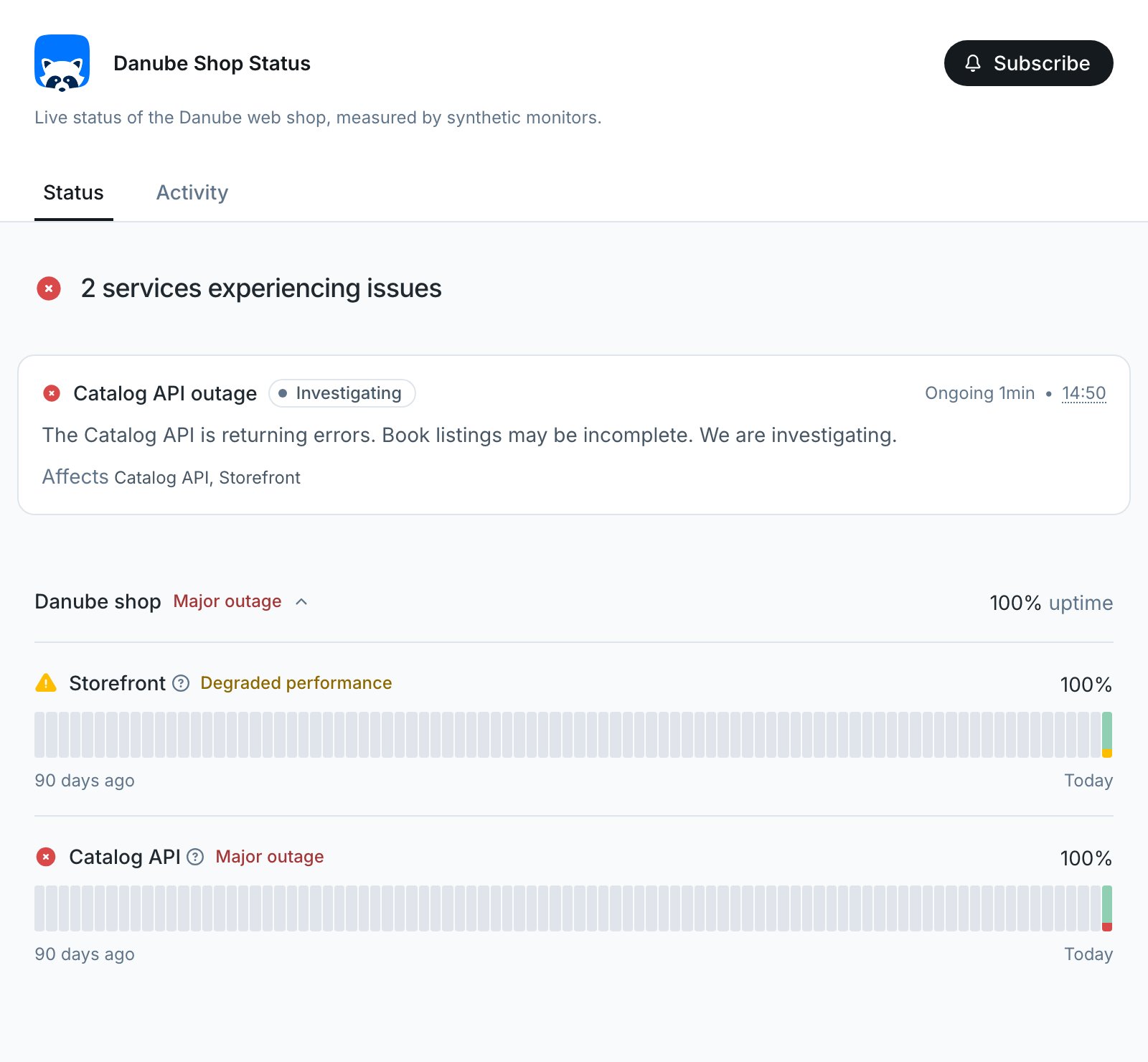
The update goes straight to the public page, so read what your agent drafted before you let it post. Change the assertion back to `equals(200)` and deploy again. The next passing run resolves the incident with the rule's last update, and the incident page keeps the full timeline:

<Frame>
  <img src="https://mintcdn.com/checkly-422f444a-simo-red-1015-maintenance-window-timezone/VdlVih9ongP3hoLV/images/guides/communicate-availability/incident-resolved.png?fit=max&auto=format&n=VdlVih9ongP3hoLV&q=85&s=985c855e82b7a249f60280f3568693a9" alt="Public incident page for Catalog API outage, lasted 1 minute, with Catalog API in major outage and Storefront in degraded performance on the component timeline, and three updates: Investigating from the automation rule, Identified posted through the MCP server, and Resolved from the automation rule" width="1600" height="1250" data-path="images/guides/communicate-availability/incident-resolved.png" />
</Frame>

## Next

[Diagnose failures with traces](/guides/reading-traces): your status page now tells users that something is broken. Find out why, from the failed check's screenshots and Playwright trace.

## Reference

* [Status pages overview](/communicate/status-pages/overview) and [incidents](/communicate/status-pages/incidents)
* [`StatusPageV3`](/constructs/status-page-v3), [`StatusPageV3Component`](/constructs/status-page-v3-component), and [`StatusPageV3AutomationRule`](/constructs/status-page-v3-automation-rule)
* [Subscriber notifications](/communicate/status-pages/subscriber-notifications) and [custom domains](/communicate/status-pages/custom-domain)
* [Checkly MCP server tools](/ai/mcp-server/tools)
* [Checkly Skills](/ai/skills)


This documentation is built and hosted on [Mintlify](https://mintlify.com), a developer documentation platform.