> ## Documentation Index
> Fetch the complete documentation index at: https://checkly-422f444a-simo-red-1015-maintenance-window-timezone.mintlify.site/llms.txt
> Use this file to discover all available pages before exploring further.
# Alert Channel Overview
> Learn how to configure alert channels with the Checkly CLI.
Alert channels let you get alert notifications when a check or monitor fails. [Learn more about alerting in our docs](/communicate/alerts/overview/).
## Common properties
All alert channels share a set of common properties to define when / how they should alert derived from the abstract class
`AlertChannel`.
Configure common alert channel properties:
| Property | Type | Required | Default | Description |
| - | - | - | - | - |
| `sendRecovery` | `boolean` | ❌ | `true` | Send notifications when checks recover |
| `sendFailure` | `boolean` | ❌ | `true` | Send notifications when checks fail |
| `sendDegraded` | `boolean` | ❌ | `false` | Send notifications when checks degrade |
| `sslExpiry` | `boolean` | ❌ | `false` | Send notifications for SSL certificate expiry |
| `sslExpiryThreshold` | `number` | ❌ | `30` | Days before SSL expiry to send notification |
Alert channels are assigned to checks, monitors, and groups by instantiating a class and adding the resulting object to the
`alertChannels` array:
```ts api-health.check.ts theme={null}
import { ApiCheck, EmailAlertChannel } from 'checkly/constructs'
// Create a new alert channel
const emailChannel = new EmailAlertChannel('email-channel-1', {
address: 'alerts@example.com',
})
// Create a new API check
new ApiCheck('api-health-check', {
name: 'API Health',
request: {
method: 'GET',
url: 'https://api.example.com',
},
alertChannels: [emailChannel], // Assign our email alert channel to this API check
})
```
To assign alert channels to `CheckGroupV2` constructs, you'll also need to set the [`alertEscalationPolicy`](/constructs/check-group-v2#param-alert-escalation-policy) to enable the group alerting override.
## Using `fromId()` to reference an existing channel
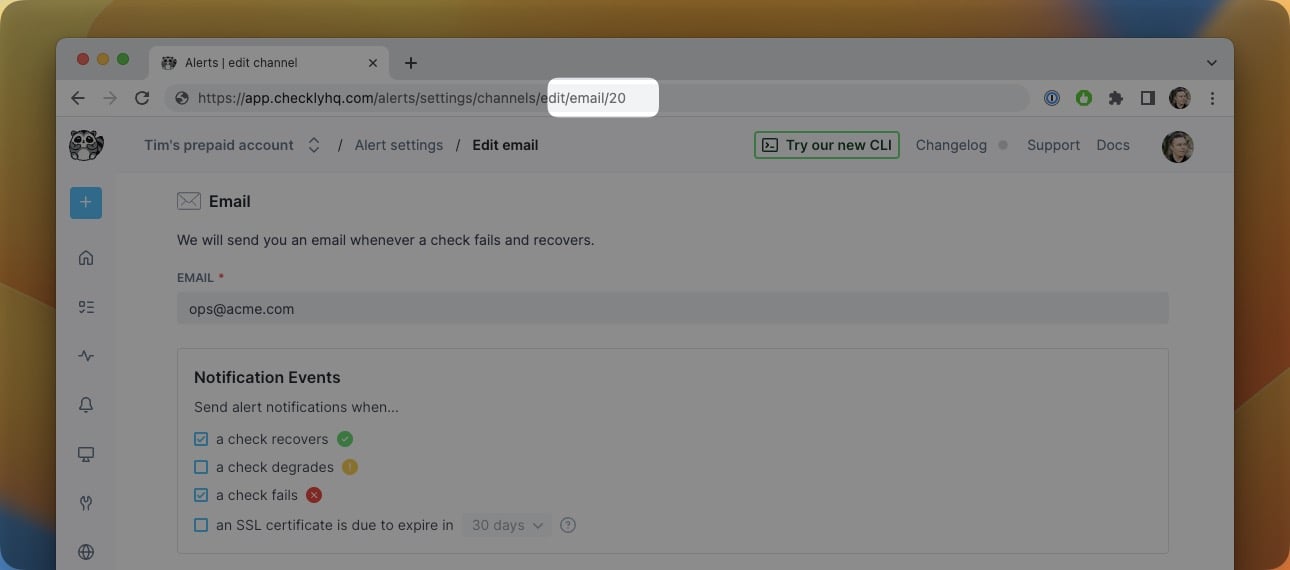
If you have an existing alert channel that was created outside of your CLI project, you can reference it using the `fromId()` method on any `AlertChannel` class:
```ts theme={null}
export const emailChannel = EmailAlertChannel.fromId(20)
```
Find the alert channel ID in the the [Checkly web UI](https://app.checklyhq.com/accounts/alerts/settings) or via our our [REST API](/api-reference/alert-channels/list-all-alert-channels/).
 If your `fromId()` references an invalid alert channel, the CLI will throw an error when you try to deploy your project.
This is useful if you have multiple CLI projects, since you can reference the same alert channel in each project without needing to redefine it each time.
If you have a single CLI project, instead of using `fromId()`, we recommend defining your alert channel within that CLI project and referencing its JS/TS object. This allows your alert channel to be managed as code alongside your other CLI resources, which makes it easier to manage and scale your alerting setup.
This documentation is built and hosted on [Mintlify](https://mintlify.com), a developer documentation platform.
If your `fromId()` references an invalid alert channel, the CLI will throw an error when you try to deploy your project.
This is useful if you have multiple CLI projects, since you can reference the same alert channel in each project without needing to redefine it each time.
If you have a single CLI project, instead of using `fromId()`, we recommend defining your alert channel within that CLI project and referencing its JS/TS object. This allows your alert channel to be managed as code alongside your other CLI resources, which makes it easier to manage and scale your alerting setup.
This documentation is built and hosted on [Mintlify](https://mintlify.com), a developer documentation platform.